SKU: 35083171633
moonlight snake plant

moonlight snake plant Moonshine Snake Plant

Sale price$19.91 Regular price$22.12
Save 10%

Pay in installments of $5.53 with ShopPay, AfterPay and Klarna

Shipping Estimate
USA
  • USA
  • CAN

Ships within 48 hours · Estimated delivery Jul 16 - Jul 21

Promo Codes Available:

For Your Every Summer RSVP, with Code: SUMMER15

Description

moonlight snake plant Moonshine Snake PlantIntroducing, the moonshine snake plant, known as Sansevieria Moonshine, a popular houseplant that belongs to the Sansevieria genus. Native to West Africa, it is a variety of the Sansevieria trifasciata. It has several other common names such as the Sansevieria trifasciata Moonshine, Silver Snake Plant, Silver Sansevieria, Sansevieria moonglow, or Dracaena moonshine, highlighting its attractive silver coloration. The Moonshine Snake Plant is a popular

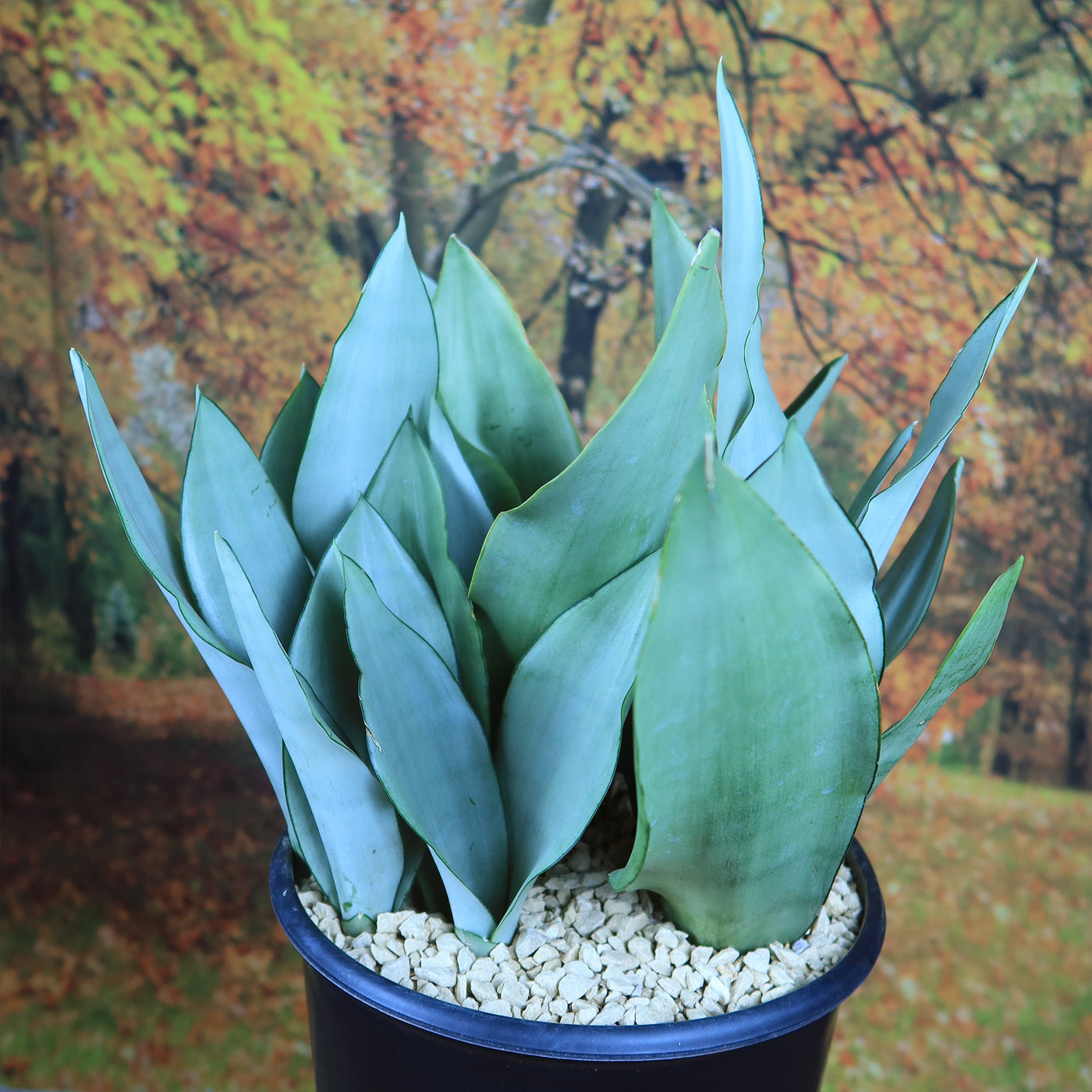
Introducing, the moonshine snake plant, known as Sansevieria Moonshine, a popular houseplant that belongs to the Sansevieria genus. Native to West Africa, it is a variety of the Sansevieria trifasciata. It has several other common names such as the Sansevieria trifasciata Moonshine, Silver Snake Plant, Silver Sansevieria, Sansevieria moonglow, or Dracaena moonshine, highlighting its attractive silver coloration. The Moonshine Snake Plant is a popular choice for indoor plant enthusiasts, with its silvery-green leaves that have a moonlight glow. 

This moonshine snake plant features long, upright leaves that grow in a rosette pattern. The leaves are thick with a smooth texture of a beautiful silvery-green hue and bold green edges. They have a unique cylindrical shape, narrowing towards the tips, which adds to their visual appeal. The Moonshine Snake Plant can grow up to 4 feet tall in its natural habitat and 2 feet tall indoors, making it suitable for both small and large spaces. 

Sansevieria Moonshine blooms in spring and summer, with fragrant green and white flowers on tall spikes. These sweet-smelling flowers will last 2 to 3 weeks. While the blooms are not the main attraction of these indoor plants, they can add a touch of elegance to their overall appearance. 

Propagating Snake Plant moonshine is relatively easy. It can be propagated through leaf cuttings or by dividing the plant's rhizomes. Leaf cuttings can be placed in water or directly in well-draining soil until they develop roots. Dividing the plant involves separating the offshoots or rhizomes and planting them in separate pots to get new plants. 

Moonshine Snake plants, known for their hardiness, low maintenance, and style, are commonly found in offices, lobbies, stores, and homes. The most common types of snake plants include Sansevieria trifasciata (Mother in law’s tongue plant), Sansevieria trifasciata 'Laurentii' (Variegated snake plant), and Sansevieria zeylanica (Zeylanica snake plant), which is gaining popularity in various settings. 

Watering Needs 

Like other tropical plants, this drought-tolerant Sansevieria Moonshine prefers moderate watering. Allow the soil line to completely dry out between waterings. Overwatering can lead to root rot, so it's best to err on the side of underwatering rather than overwatering. Before watering, check the moisture level of the soil by sticking your finger about an inch deep into the soil. If it feels dry at that depth, it's time to water. If it's still slightly moist, wait a bit longer. 

In the spring and summer months, during the growing season, water your Sansevieria Moonshine every 2-3 weeks. While in the fall and winter months, during the dormant period, reduce watering to once every 4-6 weeks. 

When watering, make sure to thoroughly saturate the soil in the pot, allowing water to seep out of the drainage holes. This ensures that the roots receive adequate moisture without sitting in stagnant water. 

These moonshine snake plants are known for their ability to tolerate drought, so they can handle periods of dryness. Observing the moisture level of the soil and adjusting your watering accordingly will help keep your Sansevieria Moonshine happy and healthy. 

Light Requirements 

If you are growing your Sansevieria moonshine indoors, it prefers bright, indirect light for at least 4-6 hours a day. If you have a spot near a window with filtered or indirect sunlight, that would be ideal. However, this moonshine snake plant can also thrive in areas with medium light, making it a perfect choice for those with less sunny spaces in their homes. 

If you decide to move your Sansevieria Moonshine outdoors, it's important to consider its light requirements. Your moonshine snake plant can tolerate full sunlight, but it's best to provide it with bright indirect light or partial shade. Too much direct sun can scorch the leaves, so finding a spot with filtered sunlight or placing it under a shade structure would be beneficial. If you live in a region with intense sunlight, it's a good idea to acclimate the plant gradually to prevent leaf burn. 

Remember, finding the right balance of light is crucial for this beautiful plant. Too little light can result in leggy growth, while too much direct sunlight can cause leaf damage. Observing your snake plant's moonshine response to its current light conditions and adjusting accordingly will help ensure its health and growth. 

Optimal Soil & Fertilizer Needs 

The Sansevieria moonshine prefers very airy, porous, nutrient-rich soil with a pH of 6.5 - 7.5. Succulents require fast-draining soil that dries completely between waterings. Your soil must have a sandy texture and a low water-holding capacity, just like desert soil. Soggy wet soil can damage your moonshine snake plant and contribute to bacterial and fungal rot. In addition, because of a lack of oxygen, soggy soil substitutes air pockets with water, resulting in an anaerobic environment that can kill your snake plant. 

As an alternative, you can create your own potting mix by combining equal portions of perlite, coarse sand, and good natural potting soil. Ideally, you want to use our specialized succulent potting mix that contains 5 natural substrates and organic mycorrhizae to promote the development of a strong root system that helps your succulent to thrive. 

The Sansevieria Moonshine is a relatively low-maintenance plant when it comes to fertilizing. During the growing season in the spring, you can feed your Moonshine Snake Plant with a balanced (5-10-5), water-soluble NPK fertilizer once a year. However, be careful not to over-fertilize, as it can lead to salt buildup in the soil. 

It's important to note that the Sansevieria Moonshine is a slow-growing snake plant, so it doesn't have high nutrient requirements. As long as you provide it with well-drained soil and occasional fertilization during the growing season, it should thrive. 

Remember, it's always a good idea to observe your plant's response to the soil and fertilizer you provide. Adjusting the watering and fertilizing routine based on its growth and overall health will help ensure its well-being. 

Hardiness Zones & More 

When growing indoors, the Sansevieria Moonshine can tolerate a warm temperature between 60°F to 85°F. It's important to avoid exposing it to extreme temperature fluctuations, as this can stress the plant. Keep it in a spot where the temperature remains relatively stable throughout the day. 

If you decide to move your Sansevieria Moonshine outdoors, it can thrive in USDA zones 10-11, where the average temperature stays above 50°F. If you live in a colder zone, it's important to protect the plant from freezing temperatures by keeping it indoors during the winter months. It can tolerate higher temperatures, but it's important to protect it from scorching direct sunlight, especially in hotter climates. 

The Sansevieria Moonshine is a relatively low-humidity plant. It can tolerate a range of humidity levels, from dry to moderate. It's well-suited for indoor environments with average humidity levels. If you live in a particularly dry climate, you can increase humidity around the plant by placing a tray of water nearby or using a humidifier. This snake plant is one of the hardiest houseplants and is extremely adaptable. 

Remember, providing the Sansevieria Moonshine with the appropriate temperature and humidity conditions will contribute to its overall health and growth. Whether you choose to keep it indoors or move it outdoors, maintaining a suitable environment will help ensure its well-being. 

Final Thoughts 

Overall, the Sansevieria Moonshine (Moonshine Snake Plant) is a low-maintenance snake plant for succulent plant lovers of all levels. With its striking silvery-green leaves, easy propagation methods, and ability to thrive in various indoor conditions, this moonshine snake plant adds a touch of elegance to any space. While it occasionally produces small, fragrant flowers, its main allure lies in its unique foliage. It thrives in bright, indirect light and only needs to be watered when the top inch of soil is dry. Additionally, it is important to avoid overwatering as this can lead to root rot. You can grow your plant indoors in warm temperatures between 60°F to 85°F, and outdoors in USDA zones 10-11. We think you will love this snake plant order your very own Sansevieria moonshine snake plant for sale today and start enjoying its beauty in no time! 

Shipping Notes
  • Free Standard Shipping on $100+ Orders to the USA.
  • Except Preorder products are shipped in 48 hours.
  • Delivery to the USA:
  1. Standard Shipping : 3-10 business days
  • If time is of the essence, please consider selecting expedited delivery for faster service.
Exchange/Return Notes
  • We offer a 30-day return/exchange service after receiving.
  • Final sale items are not eligible for returns or exchanges.
  • To process your return/exchange, please contact us at [email protected]
  • Please click here for more details>>> Return & Exchange Policy
SKU: 35083171633

Discover Niche Categories That Outsell moonlight snake plant

Top-Converting Item to Boost Your Average Order

4.4 ★★★★★
Based on 17 reviews
Sort
Highest Rating
Newest First
Oldest First
Product Reviews
G
Verified Purchase
Guy in a chair
Natrona Heights, US
★★★★★ 4
Great quality prints and ink longevity/savings over a cartridge printer but at times a bit finicky.
First, the print quality is outstanding and the money I saved on ink vs what I spent on ink cartridges from my old inkjet printer has been substantial. I printed over 8500 photos on my ET 8500 until it died…unfortunately right after I filled all the tanks with ink. I did go through the gray (GY) ink faster than the others but not sure why. After approximately 5000 prints i began to get frequent paper jamb error messages when there wasn’t any paper jamb. I eventually found a clumsy time-consuming work-around but not ideal. On the plus side, I give Epson customer phone support a decent grade, but it depends on who in India you get for help. The other nice thing is that it has a two year warranty, so something to consider if you’re thinking about buying Amazon’s 3-year warranty because you’d basically be buying a one-year warranty. Still if you print as many pics as I do, it might be worth it. So, would I buy it again? Yes, and in fact I plan to do just that.
WAS THIS REVIEW HELPFUL?YesReportShare
Reviewed in the United States on September 14, 2024
B
Verified Purchase
Bob Goldrick
West Palm Beach, US
★★★★★ 5
Epson ET-8500 versus Canon G620
I am an accomplished amateur photographer, not a professional or a techie. I take photos with an iPhone 12 and a Panasonic SLR. I do not make highly technical adjustments to the images. Both of these printers produce excellent results. I purchased them for two reasons: saving on ink, and printing photographs with accurate colors. I have used Canon Pixma printers for decades, so I first tried the G620. Although I do most of my shopping on Amazon I purchased it at Best Buy for ease of potential return. It cost $330 (rounded up by a penny). THE CANON G620: PRO’s: It was easy to fill the six ink tanks. Canon cleverly designed the tops of each one so they can only be inserted into the correct tanks. No problem connecting to my wi-fi. Documents printed quickly and looked fine. The first 4x6 print I did was acceptable but not as good as I had expected. I corrected this quickly per the next bullet. By default my Windows laptop installed its own drivers for the printer. These are not as good as Canon’s. I went to the Canon website and downloaded and installed their drivers for the 6 series. Voila, very good photos, with accurate color and sharp edges! Thanks to other Amazon reviewers for calling this to my attention. Photos printed quickly enough. CON’S: The most significant one, and why I switched to the Epson, is the paper handling. There is only one input tray, at the rear of the printer, which takes all sizes and types: 8x11 plain paper, 4x6, 5x7 and 8x11 photo paper, etc. At first I didn’t think I’d mind changing the paper, but after a while I did, per next bullet. The display on the top of the printer is small, dim and awkwardly placed. I thought I might not need to use it that much, but every time you change paper you have to. You need to pull the output tray out manually. No big deal if you are at your desk, but if you are in another room and want to print out an item on your phone you have to go the printer. A minor inconvenience but a nettlesome one at times. THE EPSON ET-8500:. PRO’s: Equally easy to connect to wi-fi. Even easier to set up. The correct drivers were downloaded automatically. A terrific screen on the right front of the printer. Large, bright, easy to use. Two input trays at the front, one for 4x6 and 5x7 photo paper, the other for 8x11 paper of either type. Another input tray at the back! I use this on the relatively few occasions I print 8x11 photos, and I keep plain paper in the front tray. This is extremely convenient. When you send an item to the printer it wakes up even if it’s turned off. The G620 did not do that. The output tray comes out automatically; no need to pull it. There is a button on the screen for pushing the output tray back in and closing the front. That bright tilt-able front screen has every setting you need and is very intuitive. Everything I printed came out fine and quickly. The photos were equal to Canon’s in quality, plus there is an Epson app for making further adjustments to them. I downloaded it and found it easy to use. CON’s: The cost: $700. That’s more than double the Canon G620, which is a significant consideration. Two others that are not significant. The photo tray can be a little tricky to pull out and a tight fit when reinserting (it goes well toward the back). This can be relieved by first pulling out the 8x11 tray underneath it, giving your fingers more room. Not really a con but when the printer is finished the screen shows two items: a little Home icon on the left and a larger “Troubleshooting” message next to that. Some users might think that means there was a problem, but it’s just in case there was. Touch Home and you’re set, then touch the Close Tray button on the bottom right. BOTTOM LINE: You may be wondering, Why spend that much more? And, why not buy a Canon Ink Tank printer of equivalent cost? Re the first, for the convenience of the paper handling and ease of use of the screen. I keep printers a long time and the cost spreads out over the years, especially not needing to buy cartridges. Re the second, I did research those, but prefer the size of the Epson, which is comparable to the G620. The higher priced Canons that I looked at were bulkier. I hope this helps others. If I omitted anything you think should be included, or if you have questions or a difference of opinion, leave a comment and I’ll respond to it.
WAS THIS REVIEW HELPFUL?YesReportShare
Reviewed in the United States on November 18, 2022
G
Verified Purchase
G. Heumann
San Leandro, US
★★★★★ 5
Very happy! ALMOST perfect.
I have a home based small business - I print a lot of user guides, invoices, etc. Long time Epson user, most recently had a Epson Workforce Pro WF-4820 to compare this to. On the plus side, the ET-8500 is smaller, quieter, and even plain paper prints that combine text and photos look better. And of course, the ink tanks are a big advantage. I don't know how many thousands of dollars of ink I bought for that 4820. The marketing says the ET-8500 produces "lab quality color prints" and I do use my printer for photos on occasion. What they say is true. On premium glossy paper, the photo quality is absolutely outstanding! :) A couple of minor negatives - The biggest one is that the tray holds much less paper. Not a huge deal but worth knowing if you're a heavy user. The ET-8500 is a little slower for duplex printing but otherwise speed is good. I had one bit of confusion as I was trying out all the functions - I loaded a sheet of paper in the rear feeder to try it, and pressed "copy". Even though the printer recognized I had put paper in the rear feeder, instead it copied nothing and spat out a piece of paper from the main tray. I assumed the rear feeder didn't work. A call to Epson Support was very well handled though, and I learned a) this is NOT an automatic document feeder - a feature the WF-4820 did have (but that I hardly ever use) - it is only an alternate way of loading a sheet of paper (such as for loading a sheet of photo paper when you have plain paper in the main tray) AND it will not feed paper from the rear tray for copying - only for printing. I'm not upset about this, but the documentation was sorely lacking in pointing this out and there were no error messages. Lastly, the printer looks very nice when all closed up. When you print, it automatically opens and extends the output tray. Nice. But it doesn't put it away again - you have to do that manually from the front panel. Sure would be nice if there were an option to retract it automatically when the printer goes to sleep.
WAS THIS REVIEW HELPFUL?YesReportShare
Reviewed in the United States on April 12, 2025
G
Verified Purchase
Glenda Breland
Whiting, US
★★★★★ 5
Vibrant Results and Great Value!
Size: 13"*19", Color: 150 sheets
HTVRONT Sublimation Paper 13x19 inches – 150 Sheets Review I recently purchased the HTVRONT Sublimation Paper (13x19 inches, 150 sheets, 120g) and I’m genuinely impressed with the results! As someone who does a lot of sublimation printing for both personal and small business projects, I found this paper to be a fantastic choice. Pros: Excellent Print Quality: The colors transfer beautifully and vibrantly onto my blanks. Images come out crisp and true to the original design. Generous Size: The 13x19 inch sheets are perfect for larger projects like T-shirts, tote bags, and even custom pillowcases. It’s great not having to piece together smaller sheets. Easy to Use: The paper feeds smoothly through my inkjet printer with no jams or smudging. Instructions were clear, making the process straightforward even for beginners. Consistent Results: Every sheet in the pack performed consistently, with no noticeable defects or wasted paper. Value for Money: With 150 sheets in the pack, it’s a great deal for the price, especially for anyone who does frequent sublimation work. Cons: Requires Sublimation Ink: Just a reminder that you’ll need sublimation ink for best results (not regular inkjet ink). Storage: The large size means you’ll need a bit of space to store the pack, but that’s a minor issue. Overall: I highly recommend the HTVRONT Sublimation Paper for anyone looking for reliable, high-quality results. It’s perfect for both hobbyists and small business owners. I’ll definitely be purchasing again!
WAS THIS REVIEW HELPFUL?YesReportShare
Reviewed in the United States on August 25, 2025
M
Verified Purchase
Maryann Cairo
San Leandro, US
★★★★★ 5
Excellent Sublimation Paper – Perfect Prints Every Time!
Size: 8.5"*11", Color: 150 sheets
This sublimation paper is fantastic! It’s high-quality and works perfectly with my sublimation printer. The prints come out vibrant, sharp, and transfer beautifully onto mugs, shirts, and other materials without smudging or fading. The paper is easy to handle, doesn’t jam in the printer, and holds the ink well for a clean transfer. I’ve tried other brands before, but this one consistently gives professional-looking results. Definitely a must-have for anyone doing sublimation printing!
WAS THIS REVIEW HELPFUL?YesReportShare
Reviewed in the United States on November 13, 2025

recommand products